Setup guide — Meta Muse
Tell Muse what you want done.
Task-first setup help for Meta's personal AI agent. Pick a job, connect the app, copy the prompt — running in minutes.
🌱 New? Start here (10 min) · ⚡ Power user? Skip ahead
- 6
- Tasks
- 15
- Connectors
- 2 min
- To start
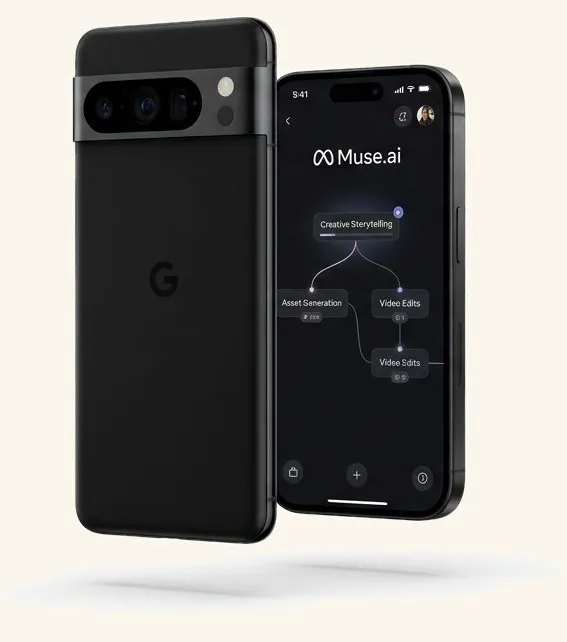
What is Meta Muse?
Meta Muse is Meta's personal AI agent — an assistant that takes real actions instead of only answering questions. It runs in a secure virtual machine with its own browser, works across the apps you connect (Gmail, Calendar, Plaid, OpenTable and more), keeps running when you close the app, and asks your approval before sending, booking or buying anything. You talk to it like texting, in the Muse app, on the web at muse.ai, or in WhatsApp.
Unofficial guide — verify anything official at ai.meta.com/muse. New here? Start with the 10-minute path →
Key facts about Meta Muse
Checked Sep 30, 2026
- Launched
- 8 September 2026, in the United States. Meta newsroom →
- Where it runs
- Muse app on iOS and Android, the web at muse.ai, and WhatsApp — with AI glasses coming later. Meta announcement →
- Under the hood
- Meta's Muse Spark model, inside Muse Secure VM — a dedicated virtual machine with its own browser that keeps your data separate from other users. Reuters →
- Price
- Free for most use with a usage limit; signup asks for a payment card. Press reports put paid plans at about $20/month and $100/month — confirm inside the app. TechCrunch →
- Who can join
- 18+, US-only at launch. Expansion plans live on Meta's official pages.
- What it connects to
- Built-in connectors for email, calendar, banks, restaurants, music, health and smart home — plus public APIs and a browser fallback for everything else. TechCrunch →
- What it does
- Sends email, books reservations, tracks spending, plans trips and workouts, and monitors goals in the background — always asking before it acts. ai.meta.com/muse →
01 — New to Muse
Start here.
Muse does the work — inbox, calendar, spending, trips. Chat like texting, in the app or WhatsApp. Free with limits.
02 — Task setup
Put it to work.
Don't start with settings. Start with a job — each task shows exactly which connectors to plug in.
- 1. Pick a task below
- 2. Connect the app it needs — read-only first
- 3. Copy the prompt in — approve each step
Pick a job.
All tasks →Weekly briefing from inbox + calendar
Beginner · 10 min
gmail + google-calendar + google-docs
Open the playbook →
Track spending + weekly money summary
Beginner · 15 min
plaid + gmail
Open the playbook →
Book dinner without the back-and-forth
Beginner · 5 min
opentable + google-calendar
Open the playbook →
Training plan from your wearable data
Power · 20 min
withings + peloton + spotify
Open the playbook →
Plan a trip from email confirmations
Power · 20 min
gmail + google-calendar + google-docs
Open the playbook →
Tame inbox: summaries + drafts
Beginner · 10 min
gmail + outlook
Open the playbook →
15 connectors. 60 seconds each.
Tap one for setup + permissions + first prompt.
/01
Chat like texting
One long conversation in the app or WhatsApp. Interrupt anytime, stack tasks — it keeps up.
/02
Connect your apps
Gmail, Calendar, Plaid, Spotify. Start read-only, approve sends and purchases one by one.
/03
Works while you sleep
Set a goal once. Muse keeps working in the background and pings you only when it matters.
Quick answers.
All 24 answers →What is Meta Muse?
Meta Muse is Meta's personal AI agent, launched 8 September 2026. Instead of only answering questions it does the work — it runs in a secure virtual machine with its own browser, connects to apps such as Gmail, Calendar, Plaid and OpenTable, and asks your approval before it acts.
How much does Muse cost?
Free with a usage limit: light users may never pay, heavier use needs a subscription, and signup asks for a payment card. Press reports put the paid plans at about $20 and $100 a month — confirm current pricing at muse.ai before budgeting.
Is it safe to connect my bank and email?
Connect read-only first, approve sends and purchases one by one, and revoke any connector in seconds from Muse → Connectors. Banks connect through Plaid OAuth, so you never paste a bank password into chat.
Who can join Muse?
You must be 18 or older, and Muse is US-only at launch in September 2026 — available on iOS, Android, the web at muse.ai and WhatsApp.
How do I start with Muse?
Join at muse.ai/join or in the iOS or Android app, paste the point-your-Muse-here prompt from this site, connect one app read-only and run a single small task. Most people get a useful result in under ten minutes.
Who made getmusehelp.com?
An independent, unofficial setup guide — not affiliated with Meta. Every page is dated, Meta's official source is ai.meta.com/muse, and this site never sees your data: there are no accounts and no logins.
More detail in the full FAQ — pricing, safety, referral codes, privacy. Something broken? Fix a problem →